Open Telemetry and ignio

ignio Overview

ignio™ is a SaaS-based platform that paves the way for the autonomous enterprise with unified observability across IT and business layers, AI-powered insights for predictive and proactive operations, and closed-loop automation for resolving incidents and improving operational efficiency.

ignio™ leverages its deep understanding of the IT landscape and its dynamic behaviour to take autonomous actions based on the current context. ignio has 10K+ modular automations across 45+ technologies which are structured, easily extensible and adaptable to changes in IT technology, enabling enterprises to quickly deploy last mile remediations.

Using Telemetry Data with ignio

ignio provides a potent blend of machine learning, AI, and automation to drive digital transformation within enterprises, and improve their effectiveness and efficiency through autonomous IT operations. ignio’s ability to provide a ‘360° Context’ of an Enterprise’s IT landscape is central to all lifecycle services of IT Operations and forms the foundation for all ignio functionalities. Telemetry data (Metrics, Logs & Traces) is essential for ignio to understand behavioural health, anomaly detection, perform root cause analysis and provide predictions based on patterns.

OpenTelemetry (OTel) provides standardized protocols for collecting and routing telemetry data. OpenTelemetry also provides SDKs, libraries, and instrumentation tooling for a wide array of popular languages (such as Java, NodeJS, Python, and more).

ignio™ predominantly acts as an Observability Front-end while it also stores certain telemetry data (except Logs). It supports ways to collect and analyze telemetry data like metrics, logs, and traces from OTel-instrumented applications.

Sending Telemetry data to ignio

There are multiple ways to send Telemetry data to ignio.

OTEL Collector

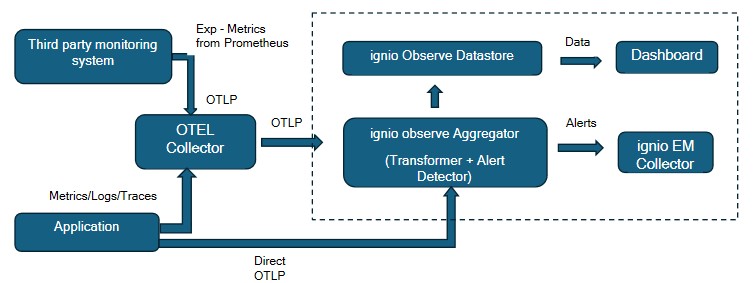
The OpenTelemetry Collector is a vendor-agnostic implementation designed to receive, process, and export telemetry data. It eliminates the need to run multiple agents or collectors to support various open-source telemetry data formats and also enables actual data export to ignio.

Direct OTLP

ignio™provides Direct API endpoint to consume Telemetry data generated by instrumented application(s).

This can be achieved by configuring telemetry data to be exported to ignio™ Observe Aggregator API directly.

ignio OpenTelemetry Architecture

Key Components of Architecture

OTEL Collector

OTEL Collector processes the telemetry data like logs, metrics and traces received from the instrumented applications as well other third-party monitoring system like Prometheus. It exports the data to ignio observe aggregator endpoint. It has four main sections Receiver, Processor, Exporter and Service Pipeline.

Receiver

Receivers collect telemetry from one or more sources.

Processor

Processors take the data collected by receivers and modify or transform it before sending it to the exporters.

Exporter

Exporters send data to one or more backends or destinations.

Service Pipeline

The service section is used to configure what components are enabled in the Collector based on the configuration found in the receivers, processors, exporters, and extensions sections.

ignio Observe Aggregator

ignio Observe aggregator is ignio component deployed in customer enterprise. It will receive the telemetry data in http/protobuf format from the OTEL collector or the application directly. Further, it will process the data to convert into ignio understandable format with relevant data massaging. Aggregator has set of rules to identify anomalies, and user has the provision to configure their own custom rules to detect the anomalies. The identified anomalies will be then raised as an alert in ignio event management, and it will be further processed or notified to required stakeholders . All the data processed by the aggregator will then be sent to observe datastore.

ignio EM

Event management analyse the alerts and do the suppression and correlation of alerts by understanding its blueprint model and pattern of occurrences to identify actionable events which will be further notified or self-healed based on configurations.

ignio Observe Datastore

ignio observe Datastore is the backend database where ignio stores all the telemetry data.

  • Metric (exp CPU, Memory, Network utilization, IO)
  • Traces (supports Java applications at present)
  • Logs (Only stores Logs after Pattern Matching and corresponding Alerts generated)

Dashboard

ignio dashboard is the one place where user can visualize the telemetry data in real-time. It also supports creation of various custom dashboards.

Configurations – Using OTEL Collector

Assumptions

  1. ignio Observe Aggregator has been installed and configured in customer enterprise to receive telemetry data
  2. ignio SaaS has been enabled with proper licence

Open telemetry Logs collector

Download Open telemetry collector

Download the open telemetry collector based on the operating system and create a dedicated directory on the host and place the downloaded package and create a config.yml which is used for monitoring

Configure Receiver

To configure the receiver to collect log from the system make sure the below configuration is present in the config.yml

Note: Replace <LOG FILE PATH> with the complete path of the log files to be monitored.

Configure the patterns to filter the logs and send only error patterns to aggregator

Configure Processor

Add the below section in the config.yml to add hostname and technology parameters with the data received.

Note: Replace <HOSTNAME> with the actual hostname from where the logs are monitored.

Configure Exporter

To configure the exporter to send data to ignio observe aggregator, add the below exporter section in the config.yml

Note: Replace <AGGREGATOR_HOST:AGGREGATOR_OTEL_LOGS_RECEIVER_PORT> with the aggregator hostname where it is deployed and the respective port

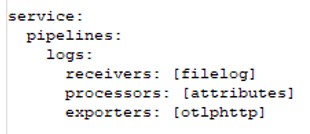
Configure Service Pipeline

The service section is used to configure what components are enabled in the Collector based on the configuration found in the receivers, processors, exporters, and extensions sections.

If a component is configured, but not defined within the service section, then it’s not enabled.

Add the below section in the config.yml

Start the Collector

Run the following command to start the collector.

Note: Replace <PATH TO> with the actual path where the Collector has been downloaded.

Aggregator

ignio observe aggregator will apply patterns or rules on the logs it receives and only the identified alerts will be stored and visualized in dashboard. All other logs will be dropped at the aggregator itself.

Validate the ignio observe dashboard

Login to ignio with valid credentials and validate the appropriate dashboards.

Open telemetry Metrics collector

Download Open telemetry collector

Download the open telemetry collector based on the operating system and create a dedicated directory on the host and place the downloaded package and create a config.yml which used for monitoring

Configure Receiver

To configure the receiver to collect OS metrics from the system where it is installed make sure the below configuration is present in the config.yml

Configure Processor

Add the below section in the config.yml to add hostname and technology parameters with the data received.

Note: Replace <HOSTNAME> with the actual hostname from where the metrics are to be monitored.

Configure Exporter

To configure the exporter to send data to ignio observe, add the below exporter section in the config.yml.

Note: Replace <AGGREGATOR_HOST:AGGREGATOR_OTEL_LOGS_RECEIVER_PORT>  with the aggregator hostname where it is deployed and the respective port.

Configure Service Pipeline

Add the below section in the config.yml to enable the component.

Start the Collector

Run the following command to start the collector.

Note: Replace <PATH TO> with the actual path where the Collector has been downloaded.

Aggregator

All the metrics has been processed by aggregator and sent to ignio datastore.

Validate the observe dashboard

Login to ignio with valid credentials and validate the appropriate dashboards.

Open telemetry Metrics collector from Third party monitoring system (Prometheus)

This section explains how we configure the open telemetry collector to send the metrics collected by Prometheus to ignio observe.

Download Open telemetry collector

Download the open telemetry collector based on the operating system and create a dedicated directory on the host and place the downloaded package and create a config.yml which used for monitoring

Configure Receiver

To configure the receiver to collect metrics from the Prometheus server, make sure the below configuration is present in the config.yml

NOTE: Replace < PROMETHEUS_SERVER> and <PORT> with the actual value represent Prometheus server end point.

Configure Processor

Add the below section in the config.yml to add hostname and technology parameters with the data received.

Note: Replace <HOSTNAME> with the actual hostname from where the metrics are to be monitored

Configure Exporter

To configure the exporter to send metrics data to ignio observe, add the below exporter section in the config.yml

Note: Replace <AGGREGATOR_HOST:AGGREGATOR_OTEL_LOGS_RECEIVER_PORT>  with the aggregator hostname where it is deployed and the respective port.

Configure Service Pipeline

Add the below section in the config.yml to enable the components defined in receiver, processor and exporter.

Start the Collector

Run the following command to start the collector.

Note: Replace <PATH TO> with the actual path where the Collector has been downloaded.

Aggregator

All the metrics have been processed by aggregator and sent to ignio datastore.

Validate the Observe dashboard

Leverage out-of-the-box dashboards available for Metrics data or create custom dashboard and for a specific visualization requirement.

Configurations – Direct OTLP

Assumptions

  1. ignio Observe Aggregator has been installed and configured in customer enterprise to receive telemetry data
  2. ignio SaaS has been enabled with proper licence

Open telemetry Log/Metrics/Traces for JAVA application

Application must be instrumented to generate the metrics, logs and traces data. Two types of instrumentation are available – one is code-based solution, and another is zero-code solution.  Refer OTel instrumentation documents to instrument your application

Please choose the zero-code instrumentation solution to send the logs, metrics, traces for a java application.

Download open telemetry java agent

Download the otel java agent using the below link of opentelemetry site and place it in the folder where application is running.

https://opentelemetry.io/docs/zero-code/java/agent/

Edit the executable file (run.sh/entrypoint.sh)

Edit the executable file by adding the following options:

Note: Replace <PATH TO> with the actual path where the opentelemetry-javaagent has been downloaded. Replace AGGREGATOR HOST and respective PORTS with the actual hostname and port where aggregator is deployed and running in the enterprise.

Restart the application service

Restart the service of the application for changes to reflect.

Aggregator

All the metrics and traces are processed by aggregator and sent to ignio datastore. In case of Logs data, Observe aggregator will apply patterns or rules to the logs and only the identified logs will be stored and visualized in dashboard. All other logs will be dropped at the aggregator itself.

Validate the dashboard

Telemetry data received by Observe aggregator is used in real-time dashboards. Below are few screenshots of such dashboards using Metrics, Logs and Traces.

Key Benefits

  • Achieve Unified Observability by combining OpenTelemetry and ignio
    • Open Telemetry APIs, SDKs for telemetry data generation (instrumentation)
    • Data transition to ignio using OTel native mechanisms – Collector, OTLP
    • Visualization, intelligent insights & powerful analytics with ignio
  • OpenTelemetry & ignio – One Intelligent Platform for:
    • Unified Observability – Horizontal and Vertical Observability to connect dots across business and underlying IT
    • Intelligent Insights – ignio’s AI/ML backbone for prediction-based continuous improvement
    • Closed loop automation – Leverage ignio’s 10K plus, inbuilt knowledge components to perform closed loop automation
  • Unified & standard way of Telemetry Data Lifecycle
    • OTel is open source
    • Vendor-agnostic – You own the telemetry data you generate
    • Data export is easy and can be coupled with any Observability back-end and front-end
  • Opportunities for Tools Rationalisation and Cost Optimization
    • Reduce/Replace/consolidate multiple Monitoring solutions to generate Telemetry data